> For AI agents: the complete documentation index is available at /zh/llms.txt, the full documentation bundle is available at /zh/llms-full.txt.
# 介绍
Rsbuild 是一个由 [Rspack](https://rspack.rs/zh/) 驱动的现代 Web 应用构建工具。
它提供快速的构建体验和高度优化的构建产物,同时保持配置简单一致,并支持通过插件进行扩展。
## 性能 \{#performance}
基于 Rspack 的 Rust 架构,Rsbuild 能够提供极致的构建性能,为你带来全新的开发体验。
构建一个大型 Web 应用的时间:
Rsbuild
1.36s dev
3.35s build
160ms hmr
Vite
6.50s dev
1.98s build
130ms hmr
webpack
21.40s dev
28.10s build
2.78s hmr
> 📊 Benchmark 结果来自 [build-tools-performance](https://github.com/rstackjs/build-tools-performance)。
## 对比其他工具 \{#comparisons}
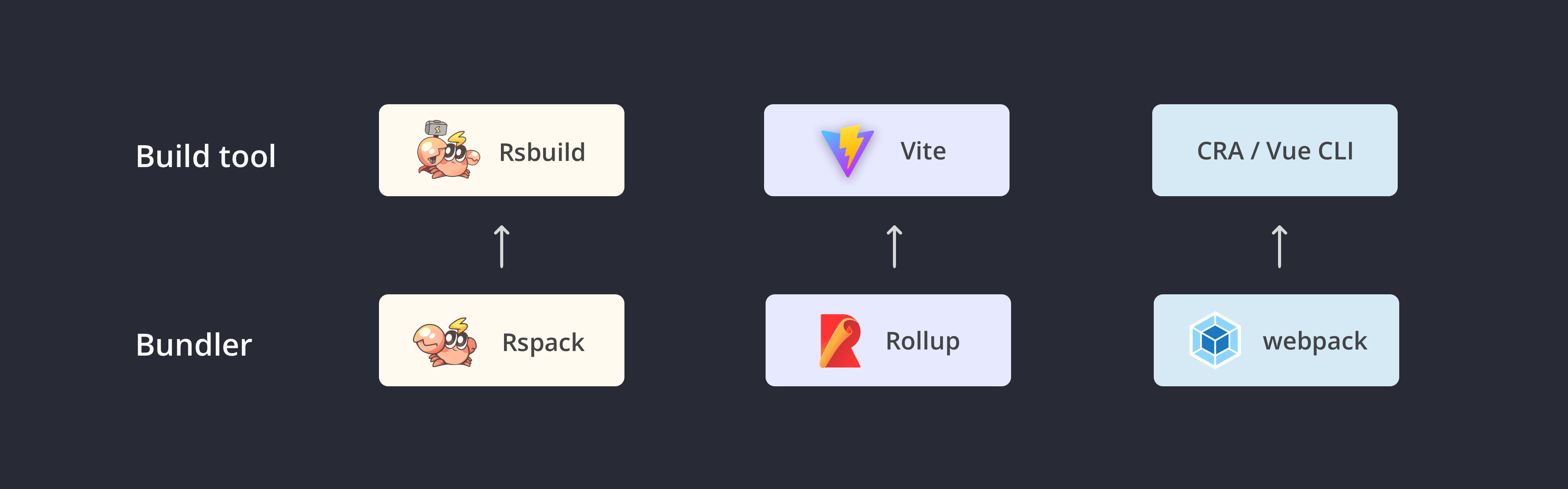
Rsbuild 是与 [Vite](https://vitejs.dev/)、[Create React App](https://github.com/facebook/create-react-app) 或 [Vue CLI](https://github.com/vuejs/vue-cli) 相似的构建工具,它们都默认包含了开发服务器、命令行工具和合理的构建配置,以此来提供开箱即用的体验。
### CRA / Vue CLI
你可以将 Rsbuild 理解为一个现代化的 Create React App 或 Vue CLI,它与这些工具的主要区别在于:
- 底层的打包工具由 webpack 替换为 Rspack,提供 5 \~ 10 倍的构建性能。
- 与前端 UI 框架解耦,并通过 [插件](/zh/plugins/list/index.md) 来支持所有 UI 框架,包括 React、Vue、Svelte、Solid 等。
- 提供更好的扩展性,你可以通过 [配置](/zh/config/index.md)、 [插件 API](/zh/plugins/dev/index.md) 和 [JavaScript API](/zh/api/start/index.md) 来灵活地扩展 Rsbuild。
### Vite
Rsbuild 与 Vite 有许多相似之处,它们皆致力于提升前端的开发体验。其主要区别在于:
- **生产一致性**:Rsbuild 在开发阶段和生产构建均使用 Rspack 进行打包,因此开发和生产构建的产物具备强一致性。而 Vite 在开发阶段使用 ESM 加载模块,这虽然提升了启动速度,但开发和生产构建的产物容易出现不一致。
- **生态兼容性**:Rsbuild 兼容大部分的 webpack 插件和所有 Rspack 插件,而 Vite 则是兼容 Rollup 插件。如果你目前更多地使用了 webpack 生态的插件和 loaders,那么迁移到 Rsbuild 会更容易。
- **模块联邦**:Rsbuild 团队与 [Module Federation](/zh/guide/advanced/module-federation.md) 的开发团队密切合作,并为 Module Federation 提供一流的支持,帮助你开发微前端架构的大型 Web 应用。
## 特性 \{#features}
Rsbuild 具备以下特性:
- **易于配置**:Rsbuild 的目标之一,是为 Rspack 用户提供开箱即用的构建能力,使开发者能够在零配置的情况下开发 web 项目。同时,Rsbuild 提供一套语义化的构建配置,以降低 Rspack 配置的学习成本。
- **性能优先**:Rsbuild 集成了社区中基于 Rust 的高性能工具,包括 [Rspack](https://rspack.rs/zh/)、[SWC](https://swc.rs/) 和 [Lightning CSS](https://lightningcss.dev/),以提供一流的构建速度和开发体验。
- **插件生态**:Rsbuild 内置一个轻量级的插件系统,提供一系列高质量的官方插件。此外,Rsbuild 兼容大部分的 webpack 插件和所有的 Rspack 插件,这意味着你可以在 Rsbuild 中使用社区或公司内现有的插件,而无须重写相关代码。
- **产物稳定**:Rsbuild 设计时充分考虑了构建产物的稳定性,它的开发和生产构建产物具备较强的一致性,并自动完成语法降级和 polyfill 注入。Rsbuild 也提供插件来进行类型检查和产物语法检查,以避免线上代码的质量问题和兼容性问题。
- **框架无关**:Rsbuild 不与前端 UI 框架耦合,并通过插件来支持 React、Vue、Svelte、Solid、Preact 等框架,未来也计划支持社区中更多的 UI 框架。
## Rstack
Rsbuild 是 Rstack 的一员。Rstack 是为开发者与 Agent 打造的高性能、一体化 JavaScript 工具链。
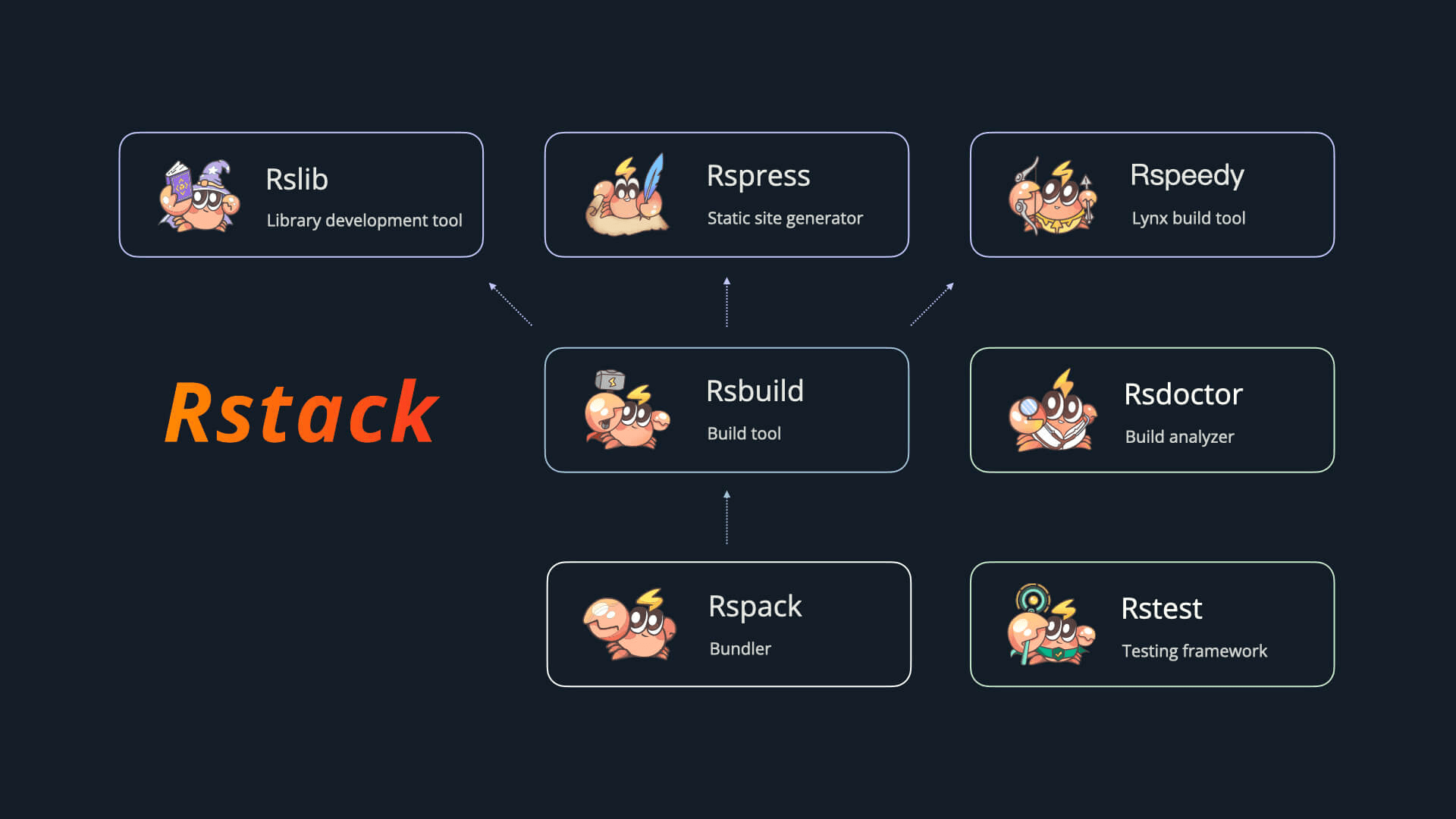
Rstack 包含以下工具:
| 名称 | 描述 | 版本 |
| ----------------------------------------------------- | ------- | -------------------------------------------------------------------------------------------------------------------------------------------------------------------------------- |
| [Rspack](https://github.com/web-infra-dev/rspack) | 打包工具 |  |
| [Rsbuild](https://github.com/web-infra-dev/rsbuild) | 构建工具 |
|
| [Rsbuild](https://github.com/web-infra-dev/rsbuild) | 构建工具 |  |
| [Rslib](https://github.com/web-infra-dev/rslib) | 库开发工具 |
|
| [Rslib](https://github.com/web-infra-dev/rslib) | 库开发工具 |  |
| [Rspress](https://github.com/web-infra-dev/rspress) | 静态站点生成器 |
|
| [Rspress](https://github.com/web-infra-dev/rspress) | 静态站点生成器 |  |
| [Rsdoctor](https://github.com/web-infra-dev/rsdoctor) | 构建分析工具 |
|
| [Rsdoctor](https://github.com/web-infra-dev/rsdoctor) | 构建分析工具 |  |
| [Rstest](https://github.com/web-infra-dev/rstest) | 测试框架 |
|
| [Rstest](https://github.com/web-infra-dev/rstest) | 测试框架 |  |
| [Rslint](https://github.com/web-infra-dev/rslint) | 代码检查工具 |
|
| [Rslint](https://github.com/web-infra-dev/rslint) | 代码检查工具 |  |
## 链接 \{#links}
- [awesome-rstack](https://github.com/rstackjs/awesome-rstack):与 Rstack 相关的精彩内容列表。
- [agent-skills](https://github.com/rstackjs/agent-skills):Rstack 的 Agent Skills 合集。
- [rstack-examples](https://github.com/rstackjs/rstack-examples):Rstack 的示例项目。
- [storybook-rsbuild](https://github.com/rstackjs/storybook-rsbuild):基于 Rsbuild 构建的 Storybook。
- [rsbuild-plugin-template](https://github.com/rstackjs/rsbuild-plugin-template):使用此模板创建你的 Rsbuild 插件。
- [rstack-design-resources](https://github.com/rstackjs/rstack-design-resources):Rstack 的设计资源。
## 社区 \{#community}
欢迎加入我们的 [Discord](https://discord.gg/XsaKEEk4mW) 交流频道!Rstack 团队和用户都在那里活跃,并且我们一直期待着各种贡献。
你也可以加入 [飞书群](https://applink.feishu.cn/client/chat/chatter/add_by_link?link_token=3c3vca77-bfc0-4ef5-b62b-9c5c9c92f1b4) 与大家一起交流。
## 在线示例 \{#online-example}
通过 [StackBlitz 示例](https://stackblitz.com/~/github.com/rstackjs/rsbuild-stackblitz-example) 在线体验 Rsbuild。
## 下一步 \{#next-step}
你可能想要:
[快速上手
了解如何使用 Rsbuild
](/zh/guide/start/quick-start)[功能导航
了解 Rsbuild 提供的所有功能
](/zh/guide/start/features)[支持 Rsbuild
点个 Star 支持一下✨
](https://github.com/web-infra-dev/rsbuild)
|
## 链接 \{#links}
- [awesome-rstack](https://github.com/rstackjs/awesome-rstack):与 Rstack 相关的精彩内容列表。
- [agent-skills](https://github.com/rstackjs/agent-skills):Rstack 的 Agent Skills 合集。
- [rstack-examples](https://github.com/rstackjs/rstack-examples):Rstack 的示例项目。
- [storybook-rsbuild](https://github.com/rstackjs/storybook-rsbuild):基于 Rsbuild 构建的 Storybook。
- [rsbuild-plugin-template](https://github.com/rstackjs/rsbuild-plugin-template):使用此模板创建你的 Rsbuild 插件。
- [rstack-design-resources](https://github.com/rstackjs/rstack-design-resources):Rstack 的设计资源。
## 社区 \{#community}
欢迎加入我们的 [Discord](https://discord.gg/XsaKEEk4mW) 交流频道!Rstack 团队和用户都在那里活跃,并且我们一直期待着各种贡献。
你也可以加入 [飞书群](https://applink.feishu.cn/client/chat/chatter/add_by_link?link_token=3c3vca77-bfc0-4ef5-b62b-9c5c9c92f1b4) 与大家一起交流。
## 在线示例 \{#online-example}
通过 [StackBlitz 示例](https://stackblitz.com/~/github.com/rstackjs/rsbuild-stackblitz-example) 在线体验 Rsbuild。
## 下一步 \{#next-step}
你可能想要:
[快速上手
了解如何使用 Rsbuild
](/zh/guide/start/quick-start)[功能导航
了解 Rsbuild 提供的所有功能
](/zh/guide/start/features)[支持 Rsbuild
点个 Star 支持一下✨
](https://github.com/web-infra-dev/rsbuild)